Icon of program: OnyX

OnyX for Mac

  • Free
  • 3.2
    503
  • 178.2K
  • V4.9.6

A macOS maintenance and configuration utility

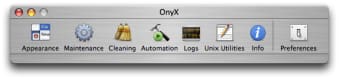
OnyX is a free utility software developed by Titanium Software for macOS. It is designed to help users perform system maintenance tasks such as verifying disk structures, cleaning system and application caches, and configuring certain hidden system parameters that are not accessible through standard macOS settings.

Top Recommended Alternative

By offering these features together in a single application, OnyX supports system upkeep and may help users maintain stable system performance through a relatively straightforward interface. Additionally, the software is released in separate versions for each macOS release, ensuring compatibility with specific system versions.

Managing macOS system maintenance tasks

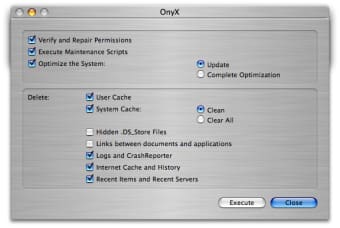
OnyX performs a variety of maintenance operations that support general system upkeep on macOS. It allows users to carry out cleaning tasks such as removing caches and rebuilding certain system databases, which can help maintain normal system operation. Users can also adjust selected hidden system settings, providing additional control over macOS behavior beyond standard system preferences.

Moreover, the software supports verification of disk structures and the execution of built-in maintenance scripts, which are commonly used as part of routine system maintenance. Because the application presents a wide range of system options, its interface may feel technical to some users, particularly those who are new to macOS maintenance tools.

Practical utility for macOS system upkeep

By bringing together essential macOS maintenance tools in a single application, OnyX provides users with a centralized way to perform routine system upkeep. Its features include cleaning caches, verifying disk structures, running built-in maintenance scripts, and adjusting selected hidden system settings, all presented through a relatively user-friendly interface. These capabilities make OnyX a practical option for Mac users who want to support regular system maintenance using a dedicated utility.


  • Pros

    • Free to download and use
    • Designed specifically for macOS
    • Multiple maintenance tools
    • Allows cache and system cleanup
    • Offers access to hidden settings
    • Separate versions per macOS release
  • Cons

    • Interface may feel technical
 0/2

App specs

Program available in other languages


Icon of program: OnyX

OnyX for Mac

  • Free
  • 3.2
    503
  • 178.2K
  • V4.9.6

User reviews about OnyX

3.2

2 reviews

Add review

Main reviews for you

  • Anonymous user

    Just seemed to hang!. Repair permissions was possibly still running after an hour, so I forced quit. It doesn't seem reasonable to not have any idea what is going on.

  • Anonymous user

    Great Tool. I was not able to make use of 2.1.9 because I have a 10.4.1 system, but I was able to download an older version that does work, So far so good. I can only rate the version I have. Don't let the fact that you have an older OX stop you from taking advantage of this Great tool.

More

You may also like

Alternatives to OnyX

Explore Apps

Latest articles

Laws concerning the use of this software vary from country to country. We do not encourage or condone the use of this program if it is in violation of these laws.


Softonic

Is OnyX safe?

100/100

Score result: Clean

This file passed a comprehensive security scan using VirusTotal technology. It is safe to download.

  • Virus free
  • Spyware free
  • Malware free
  • Verified by Security Partners

    VirusTotal logo

Scan Info

Last scan
Friday, March 13, 2026
Scan provider
VirusTotal · Full report

File Integrity

File
4.9.6.dmg
SHA256
e34d7def9b2e5a04968206ef2de8a7358ad51e1c61c84f38a25513fb5cbe7d85
SHA1
b95f1c26c7f2feb11807851b8d791827a8756160

Softonic security commitment

OnyX has been thoroughly scanned by our advanced security systems and verified by industry-leading partners. This file comes from the official developer and has passed all our security checks, showing no signs of viruses, malware, or spyware. For more information, visit our Security and Trust Center